

Managing curtains across different windows or rooms becomes much easier with the right remote control system. Remote Control Curtains offer convenient operation, allowing you to open and close your curtains without manual effort. However, choosing the right remote is equally important, especially when deciding how many curtains you want to operate together or independently. This is where single-channel and multi-channel remotes come in. Let’s understand how both options work and which one is better suited to your requirements.
What Do Channels Mean on a Curtain Remote?
Before choosing between a single-channel and multi-channel remote for your remote control curtains, it’s important to understand what a channel does. Simply put, a channel is a dedicated control setting on your remote that connects it to a particular curtain motor or a group of motors. When you select a channel and press the open or close button, only the curtains paired with that setting respond to your command. This makes it easier to manage multiple remote control curtains without having to operate every curtain separately.
For example, imagine having remote control curtains in three different rooms. You could assign each room a separate channel, giving you individual control over all three. Alternatively, if you want two curtains to move together, they can be configured under one shared channel if the system allows it.
What Is a Single-Channel Curtain Remote?
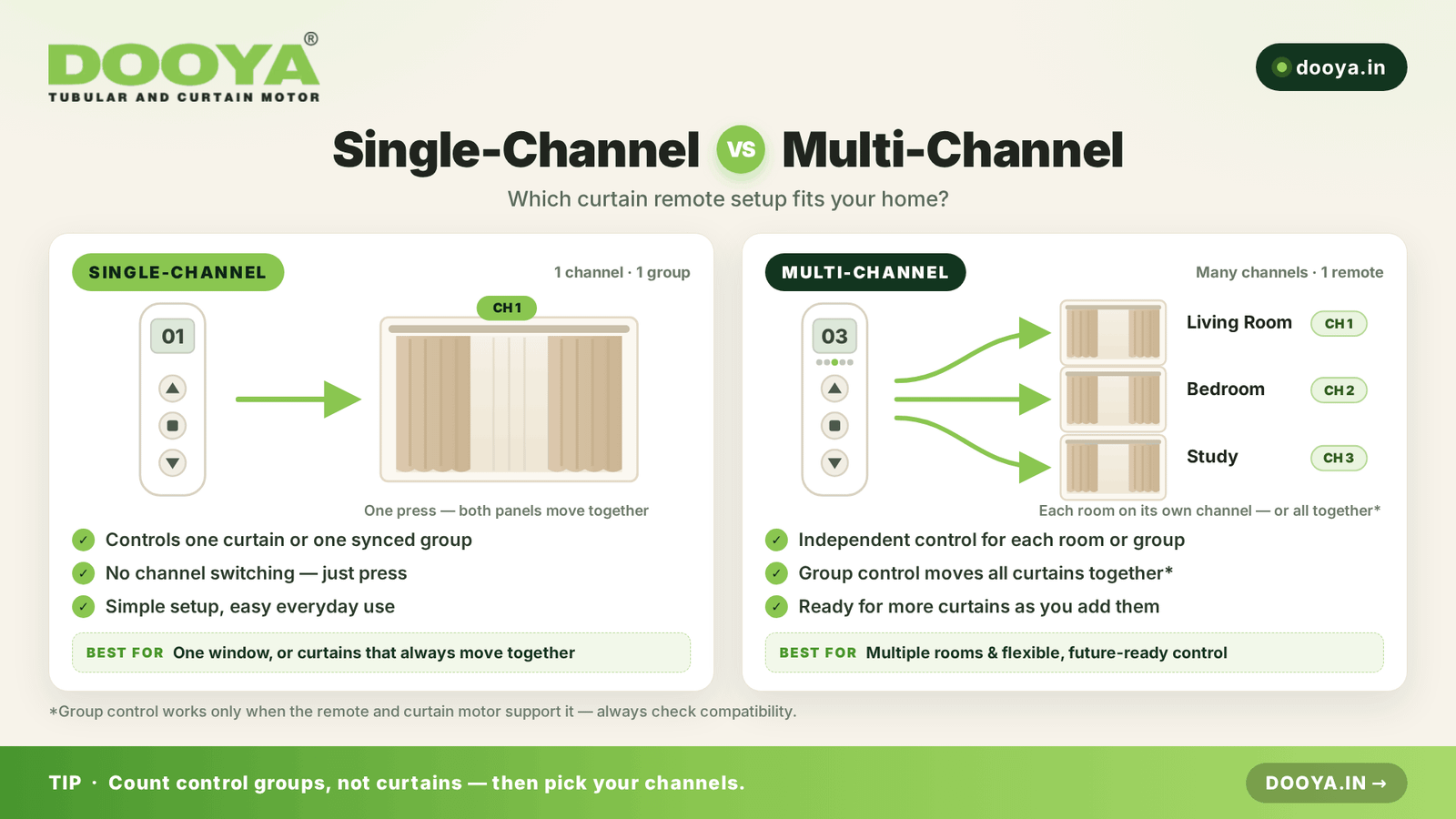
A single-channel curtain remote is designed to operate one curtain or a group of curtains that are configured to move together. It comes with one control channel, so there’s no need to switch between different settings to open or close your curtains. Simply press the required button, and the paired curtain motor responds to your command. It’s a straightforward way to enjoy the convenience of remote-controlled curtains without dealing with multiple control options.
This type of remote works particularly well for homes with a single motorised window covering or rooms where multiple curtains always operate in sync. For instance, if you have two curtains covering a large living room window and prefer them to open and close together, a single-channel remote may be all you need. It’s a simple and practical choice when independent control isn’t a priority.
What Is a Multi-Channel Curtain Remote?
Managing curtains across different rooms can get tricky when you want each set to operate at a different time. A multi-channel curtain remote makes this easier by offering multiple channels through a single remote. Each channel can be paired with a specific curtain motor or a group of motors, allowing you to choose which curtains respond to your commands. This way, you don’t have to operate every curtain together or keep separate remotes for different rooms.
For example, you could assign one channel to your living room, another to your bedroom, and a third to your study. This gives you the flexibility to adjust each set of motorised curtains according to your needs. Depending on the remote and motor compatibility, you may also be able to configure a shared channel to operate multiple curtains together.
How to Choose the Right Remote Control Curtains Setup
The right remote depends on how you want to manage your curtains. Before choosing one, consider these three things:
- Number of Control Groups: Identify how many independent curtain groups you need. Don’t confuse the number of curtains with the number of channels required.
- Individual or Group Operation: Decide whether you want curtains to move separately, together, or both, depending on your daily requirements.
- Remote and Motor Compatibility: Check whether your chosen remote and curtain motor support the channels, pairing options, and group-control functions you need.
Single-Channel vs Multi-Channel: Example Setups
The best way to understand the difference is to see how these remotes fit into everyday home setups.
- One Window: A single-channel remote is a practical choice when you have just one motorised curtain to operate.
- Two Curtains, One Room: If you prefer both curtains to move in sync, you can configure them under one shared channel if supported by the system.
- Different Rooms: For curtains spread across multiple rooms, a multi-channel remote makes it easier to operate each set without affecting the others.
- Multiple Windows with Flexible Control: If you sometimes want all curtains open and sometimes prefer controlling them separately, a compatible multi-channel setup with group control is worth considering.
Common Mistakes to Avoid
- Ignoring Motor Compatibility: Not every remote works with every curtain motor. Always check compatibility before making a purchase.
- Counting Curtains Instead of Control Groups: The number of curtains doesn’t determine the number of channels you need. Focus on how many separate groups you want to operate.
- Assuming Every Multi-Channel Remote Supports Group Control: Multiple channels don’t automatically mean you can operate several curtains together. Check whether the remote and motor support this feature.
- Overlooking Future Requirements: If you plan to add more motorised curtains later, consider whether your chosen remote can accommodate your requirements.
Frequently Asked Questions
Q1. Can one remote control multiple Remote Control Curtains?
Yes! One remote can control multiple curtains if the motors support pairing.
Q2. Can I control the curtains individually and together?
Yes. A compatible multi-channel system with group-control support allows both.
Q3. Do Remote Control Curtains need Wi-Fi?
No. Most RF-based remotes work without Wi-Fi. App-controlled features may require it.
Q4. How many channels do I need?
It depends on how many independent curtain groups you want to operate. One channel may be enough for curtains that move together, while multiple channels offer greater flexibility.
Explore Dooya’s Remote Control Curtain Solutions
The right curtain remote can make everyday living a lot more convenient. At Dooya, you can explore a range of curtain motors and control solutions designed to make managing your curtains effortless. Whether you’re looking for simple remote operation or exploring app-based controls and smart home integration, there’s a solution to suit different spaces and requirements. Visit dooya to explore our products or submit an enquiry to find the right setup for your home.
Conclusion
Choosing between a single-channel and multi-channel remote comes down to how you want your curtains to operate. While a single-channel remote keeps things simple for one curtain or a group that moves together, a multi-channel remote offers greater flexibility when managing curtains across different rooms. Consider your everyday requirements, the number of independent groups, and motor compatibility before making a choice. With the right setup, remote-controlled curtains can make managing natural light and privacy easier than ever.