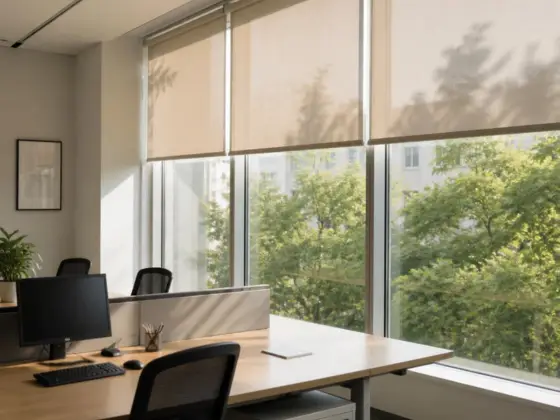

Roller Blinds for Windows
Roller blinds are one of the most popular window covering solutions worldwide, prized for their clean lines, versatility, and effortless operation. At Dooya, we take roller blinds a step further by engineering the smart motorization technology inside them, so every roll up and down is smooth, quiet, and intelligently controlled. As a global leader in motor systems for window coverings, Dooya powers roller blinds for homes, offices, hotels, and smart buildings around the world.
Whether you’re a homeowner upgrading to a smarter living space or a business fitting out a commercial property, Dooya-powered roller blinds feature a modern design and incorporate advanced automation technology.
Table of Contents
What Are Roller Blinds and How Do They Work
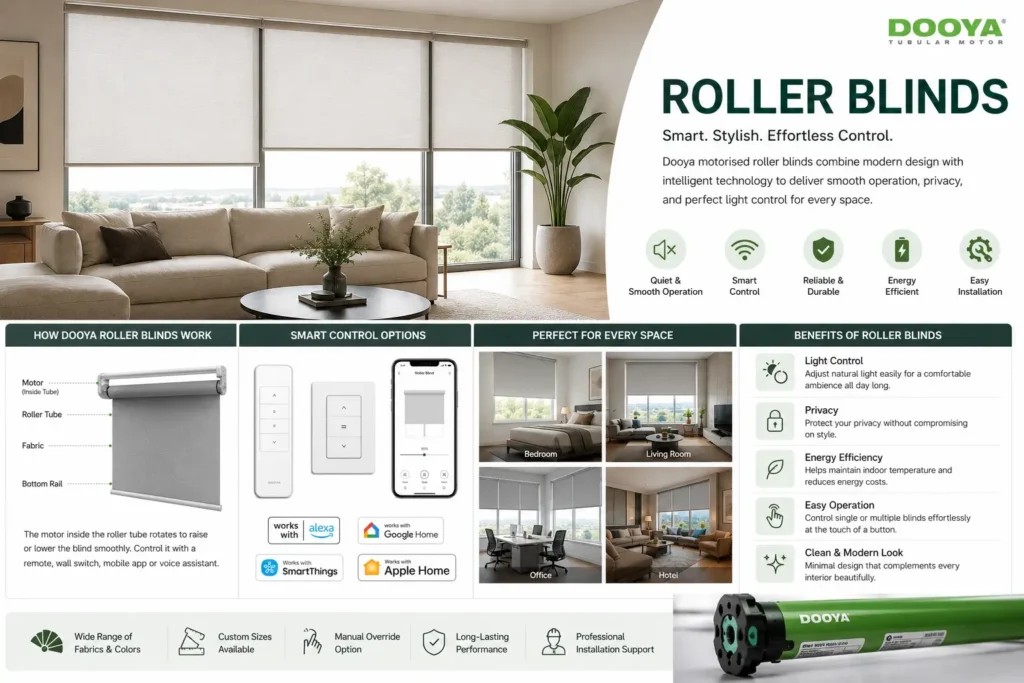
A roller blind is a single sheet of fabric that winds around a horizontal tube, or roller, mounted above the window. Raising the blind wraps the fabric neatly around the tube, lowering it unrolls the fabric to cover the glass. It’s a simple concept, but the real difference in performance comes down to what drives that roller and that’s where Dooya’s motor technology comes in.
Dooya-powered roller blinds can be controlled in several ways:
- Wall Switch Control: Simple, reliable operation at the press of a button.
- Remote Control: Adjust your blinds from anywhere in the room.
- App & Smart Home Control: Operate roller blinds via smartphone app, voice assistant, or automated schedules, fully integrated into your smart home ecosystem.
- Sensor-Based Automation: Sunlight and temperature sensors can trigger blinds to open or close automatically, optimizing comfort and energy efficiency.
The purpose of a roller blind is to regulate natural light, protect privacy, reduce heat gain, and shield interiors from UV damage and with Dooya motorization, all of this happens with the tap of a button or entirely on its own.
Types of Roller Blinds We Offer
- Motor Selection – Every project starts with choosing the right Dooya motor for the blind size, fabric weight, and control preference from compact tubular motors to high-torque commercial systems.
- Fabric & Roller Assembly – The chosen fabric is fitted to the roller tube, with the Dooya motor integrated directly inside the tube for a seamless, cable-free appearance.
- Programming & Pairing – The motor is synced with remotes, wall switches, or smart home apps, and travel limits are calibrated for precise, silent operation.
- Installation & Wiring – Brackets are mounted to the window frame or ceiling, and the motor is connected to power (battery, rechargeable, or hardwired) and paired with your chosen control system.
- Testing & Handover – Full functionality manual override, app control, and automation schedules is tested before handover, so everything works exactly as intended from day one.
Benefits of Dooya-Powered Roller Blinds
- Whisper-Quiet Motion: Dooya’s motor engineering delivers smooth, near-silent operation that won’t disrupt your space.
- Precise Light & Privacy Control: Choose sheer, light-filtering, or blackout fabrics, all managed with pinpoint motorized precision.
- Energy Efficiency: Automated scheduling and sensor integration help regulate indoor temperature, reducing reliance on heating and cooling systems.
- UV & Heat Protection: Quality fabrics combined with automated scheduling protect furniture, flooring, and interiors from sun damage.
- Effortless Convenience: No cords to pull or tangle just remote, app, or voice control.
- Space-Saving Design: Motors are built into the roller tube itself, keeping the window profile clean and minimal.
- Scalable for Any Space: Suitable for single rooms, whole-home automation, or large-scale commercial and hospitality installations.
Why Choose Dooya for Your Roller Blinds
Dooya isn’t just a supplier of motorized components we’re the technology behind smart window coverings trusted by manufacturers, installers, and homeowners globally. Here’s what sets us apart:
- Decades of Motor Engineering Expertise: Dooya has spent years perfecting tubular motor technology specifically for window coverings, resulting in reliable, long-lasting performance.
- Whisper-Quiet, Durable Motors: Our motors are engineered for smooth, quiet operation and built to withstand years of daily use with minimal maintenance.
- Seamless Smart Home Integration: Dooya motors are compatible with major smart home ecosystems, enabling voice control, app scheduling, and integration with broader home automation setups.
- Flexible Power Options: Choose from hardwired, rechargeable battery, or solar-powered motor solutions to suit any installation environment.
- Wide Product Range: From compact motors for residential roller blinds to high-torque solutions for large commercial fabric spans, Dooya has a motor engineered for the job.
- Global Trust & Support: Dooya motors are used in projects worldwide, backed by dedicated technical support and warranty coverage for total peace of mind.
Explore More Dooya Motorization Solutions
Roller blinds are just one application of Dooya's smart motor technology. Explore our other solutions to bring intelligent automation to every window and space:
- Zebra Blinds Motorization - smart control for adjustable dual-layer shades
- Curtain Motorization Systems - automate traditional curtains and drapes
- Vertical Blind Motors - ideal for large windows and sliding doors
- Smart Home Integration - connect your window coverings to a full smart home ecosystem
- Commercial & Project Solutions - motorization systems for hotels, offices, and large-scale developments
Combining Dooya-powered roller blinds with other motorized window treatments creates a fully automated, cohesive smart living or working environment.
Frequently Asked Questions
1. Can roller blinds be installed in existing windows?
2. Are roller window blinds suitable for smart homes?
Yes, roller blinds integrate seamlessly with smart home and automation systems, including app and voice control.
3. What control options are available for roller blinds?
Roller blinds can be operated manually, or via remote, wall switch, mobile app, or voice assistant.
4. Do roller blinds support scheduled or automatic operation?
Yes, motorized roller blinds can be scheduled to open or close based on time, sunlight levels, or automation routines.
5. Are roller blinds available in motorized options?
Yes, roller blinds can be manual or fully motorized, controlled by remote, app, or connected smart systems.
6. Can roller blinds be customized?
Yes, roller blinds can be customized in size, fabric, color, opacity, and control type to match your space.
7. How long do roller blinds typically last?
With proper care, quality roller blinds and their fabrics typically perform reliably for 8–10 years or more.
8. Are roller blinds energy efficient?
Yes, roller blinds help regulate indoor temperature by blocking excess heat and light, reducing reliance on air conditioning.
Get Started with Dooya Today
Ready to bring smart, effortless control to your windows? Whether you’re a homeowner, interior professional, or blind manufacturer looking to integrate industry-leading motor technology, Dooya has a solution built for you.
Contact our team today to find the right motorization solution for your roller blinds, request a product catalog, or connect with a certified Dooya dealer near you. Experience the difference smart motor technology makes one smooth roll at a time.